




Charge Your Volkswagen ID.4 at Tesla Superchargers
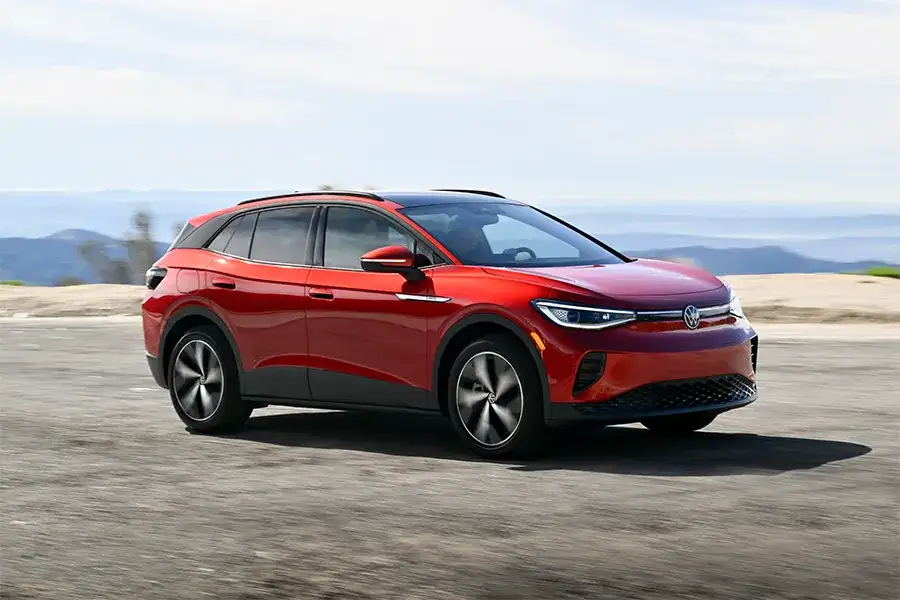
ID.4 and ID. Buzz owners can access about 25,000 compatible Tesla Supercharger “NACS Partner” DC fast chargers using the Tesla app and a Volkswagen-approved NACS-to-CCS DC adapter.¹
You need the VW-approved adapter, the Tesla app, a payment method, and a compatible “NACS Partner” Supercharger location shown in the Tesla app.¹²
Quick checklist before you leave
- Volkswagen-approved NACS-to-CCS DC fast charging adapter¹
- Tesla app with your vehicle details added²
- A saved payment method in the Tesla app²
- Confirm the station is labeled as a NACS Partner Site in the Tesla app¹
- If your vehicle is eligible, install the recommended software update information VW provides before your first session¹
Which Superchargers work with the ID.4?
Not every Tesla Supercharger is open to every vehicle. Tesla explains that some sites are Tesla-only, some are open to all EVs using Magic Dock, and some are open to other brands through manufacturer access.²
For ID.4 drivers, Volkswagen recommends using Tesla Superchargers identified by Tesla as a “NACS Partner Site.”¹ Always confirm the exact site in the Tesla app before you head there.¹²
What you need to charge
A VW-approved adapter
Volkswagen states current ID.4 and ID. Buzz owners must purchase a Volkswagen-approved adapter to use compatible NACS Partner Superchargers.¹ Tesla also notes that Supercharging for CCS1 vehicles requires an NACS DC adapter from Tesla or your vehicle manufacturer, and it prohibits third-party adapters for safety reasons.²
DC fast charging only
Volkswagen is clear that the NACS DC adapter is only for compatible DC fast chargers and is not designed for Level 1 or Level 2 AC charging, including home charging equipment and Tesla Destination Chargers.¹
The Tesla app and connectivity
Volkswagen notes Supercharger use requires cellular connectivity, Tesla app download and account setup, a payment method, and acceptance of Tesla’s terms and privacy notice.¹ Tesla provides the step-by-step app flow.²
Step-by-step: How to charge your ID.4 at a Tesla Supercharger
Step 1: Set up the Tesla app
In the Tesla app, Tesla instructs other-brand drivers to select “Charge Your EV,” add vehicle details, and add a payment method.²
Step 2: Find a compatible Supercharger
Use the Tesla app to find a compatible location and confirm availability.² Volkswagen notes Tesla provides the location, compatibility, and pricing details, and they can change.¹
This is especially helpful if you’re planning a stop on your way toward the Lakes Region and want a predictable DC fast charging option.
Step 3: Park with cable reach in mind
Tesla notes that charge-port locations vary and that you may need to park carefully to reach the cable. Tesla recommends avoiding diagonal parking and trying to obstruct as few stalls as possible.²
Step 4: Attach the adapter and plug in
Tesla says to connect the adapter to the charging cable, then plug into your vehicle.²
Step 5: Select the correct post in the app and start charging
Tesla explains that each post has a unique identifier. Select the matching identifier in the Tesla app to begin charging.²
Tesla also notes a timing detail: if you do not remove the connector within 30 seconds and plug in within one minute of selecting a post, you will need to start over.²
Step 6: Stop charging and disconnect
To end the session, Tesla says to tap “Stop Charging” in the Tesla app. Tesla then instructs drivers to press the button on top of the adapter to unlatch, then disconnect the adapter using the switch below the charging cable.²
What will you pay?
Tesla states Superchargers are pay-per-use, and you can see pricing for each site in the Tesla app.² Tesla also notes pricing can include on-peak and off-peak rates, and prices may change over time.²
Volkswagen adds that Supercharging costs and fees are billed by Tesla to the payment method you set up in the Tesla app, and Volkswagen is not responsible for charger availability, compatibility, or pricing.¹
Fees to know about
Tesla notes your choices during and after a session can trigger additional fees such as congestion fees, and it recommends enabling push notifications.²
Tesla also notes that if you do not own a Tesla vehicle, a temporary authorization hold may be placed on your payment method when a session starts in the Tesla app.²
Do you need a membership?
Tesla states you do not need a membership to use Superchargers accessible to other EV drivers, and it offers a Supercharging Membership that can lower charging costs at select sites.²
Adapter pricing and rebate details
Volkswagen states the VW-approved adapter is sold through Volkswagen dealers or online at parts.vw.com with an MSRP of $200.¹
Volkswagen also states that original owners of model year 2025 ID.4 and ID. Buzz vehicles may be eligible for a $100 rebate, and that rebate claims must be submitted within 90 days of purchase and no later than July 15, 2026.¹
Volkswagen states adapters will come standard with model year 2026 Volkswagen EVs.¹
Common problems and quick fixes
“It won’t start charging”
- Confirm you selected the correct post identifier in the Tesla app.²
- Restart the flow if too much time passed between selecting the post and plugging in. Tesla provides the timing window.²
“The cable doesn’t reach”
Tesla notes some layouts may require careful positioning. Park to minimize blocking other stalls, avoid diagonal parking, and try to obstruct as few stalls as possible.²
“I’m worried about using the wrong adapter”
Use the Volkswagen-approved adapter. Volkswagen cautions that third-party adapter use is at your own risk, and Tesla prohibits third-party adapters for safety reasons.¹²
FAQ
Will this work at every Tesla Supercharger?
No. Use the Tesla app to confirm the station is compatible for your vehicle.¹²
Can I use this adapter at home or at Tesla Destination Chargers?
Volkswagen says no. This adapter is for compatible DC fast chargers only, not Level 1 or Level 2 AC charging.¹
Should I update my vehicle software before my first session?
Volkswagen notes certain 2024 and 2025 vehicles will receive information about a recommended software update to support optimal charging behavior.¹
Should I charge to 100% on a road trip?
DC fast charging often slows as the battery fills. Many drivers stop once they have a comfortable buffer for the next leg.³
Need help getting your ID.4 set up?
If you’d like a quick walkthrough of adapter basics, Tesla app setup, and what to look for at the charger, visit Nucar Volkswagen of Tilton at 40 E Main St Lot D, Tilton, NH 03276. Everyone loves a Nucar!
Footnotes
¹ https://media.vw.com/view/releases/1891
² https://www.tesla.com/support/charging/supercharging-other-evs
³ https://www.chargepoint.com/blog/how-dc-fast-charging-really-works-and-intro-charging-curves
0 comment(s) so far on Charge Your Volkswagen ID.4 at Tesla Superchargers